You bought the AI.
Now prove it's working.

Tekkr AI is the analytics and governance layer for your AI assistants. See adoption across departments, understand what the spend is actually buying, and push company-wide configurations to every assistant from a single dashboard. GDPR compliant and live in a day.
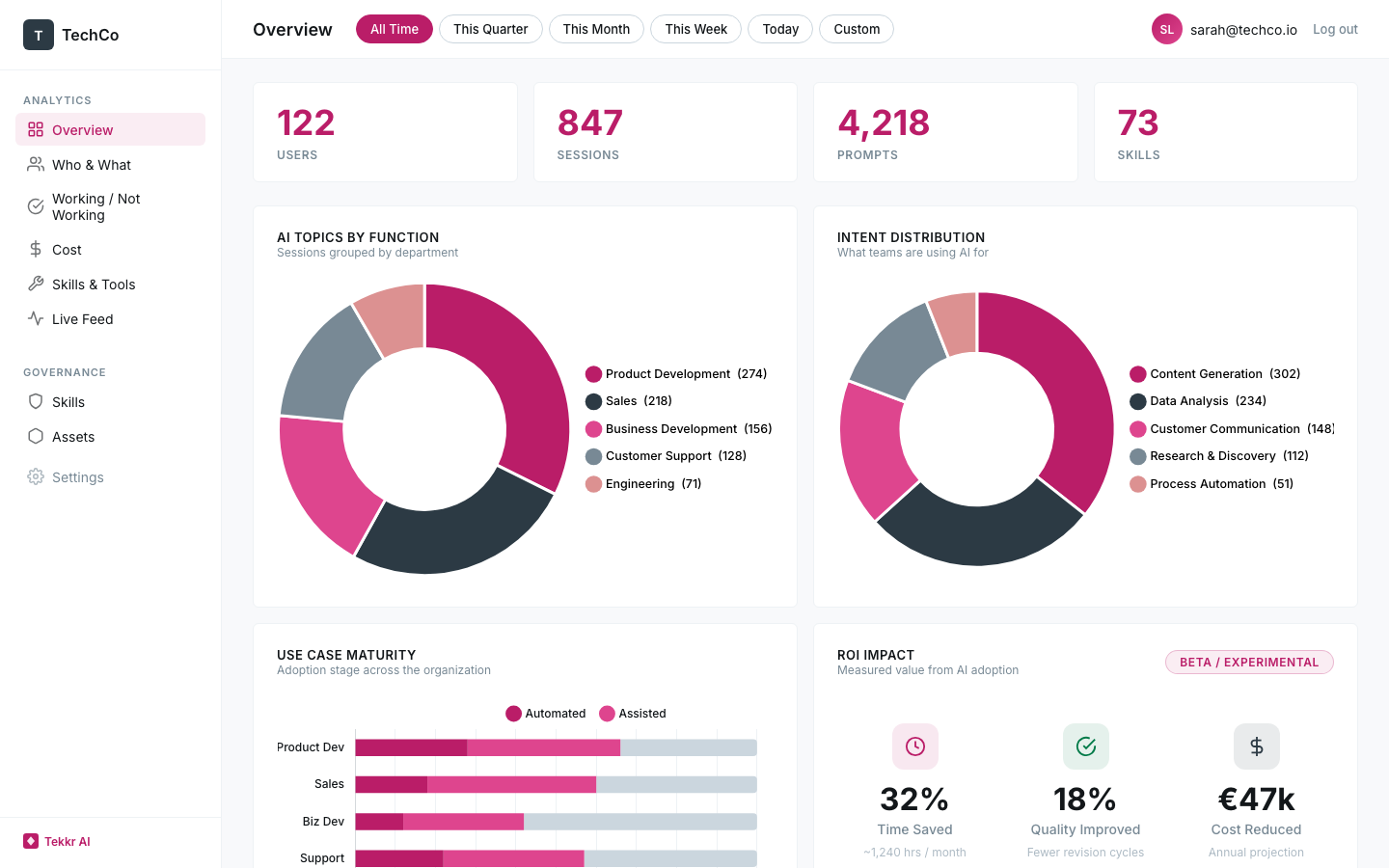
Tekkr AI Dashboard — org-wide adoption analytics by department
Built by the team behind Parloa's scale to unicorn
Parloa Orbem

The budget is approved. The visibility isn't there.

Most companies investing in AI assistants today have the same problem: they're spending real money on licenses and have almost nothing to show leadership beyond anecdotes and gut feel.

The adoption gap

The gap between "licenses deployed" and "licenses actually changing how people work" is completely invisible right now. Finance sees the line item. Nobody sees the impact.

The department black box

Engineering might be getting massive value while marketing hasn't opened it once — but without department-level data, the rollout strategy is the same for everyone.

200 people, 200 setups

Every team figured out AI on their own. The best configurations never spread. The worst ones never got fixed. There's no mechanism to standardize what works.

Finally, the full picture — without the surveillance baggage.

Tekkr AI works at the team and department level. It shows you adoption patterns, use case distribution, and cost allocation across the org — with full PII anonymization and no individual user profiles.

Adoption
Adoption by department

See which departments are using AI every day, which are still experimenting, and which haven't started. Adoption curves that tell you where enablement will actually move the needle.

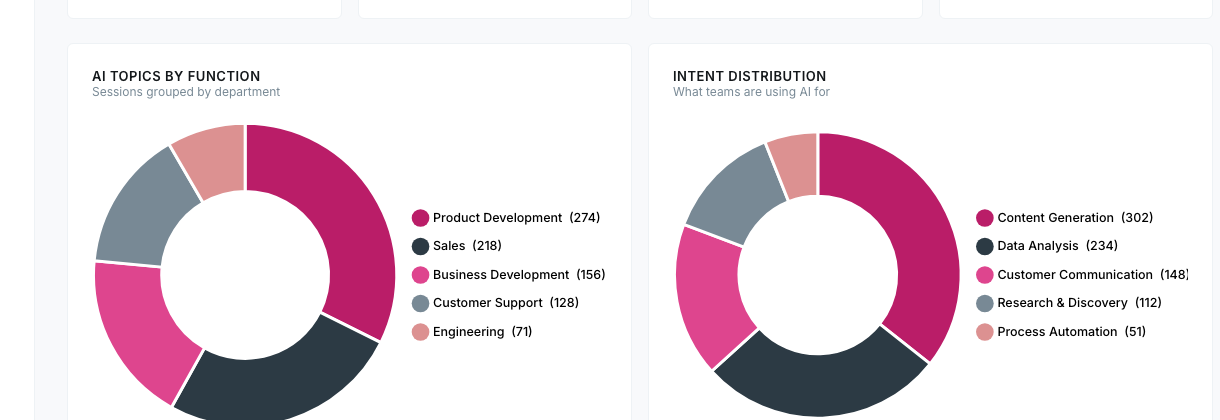
AI usage by department — donut charts showing sessions by function and intent distribution
Intelligence
Use case distribution

Content creation, data analysis, code generation, research — broken down by team so you can see where AI is creating real leverage and where it's just generating noise.

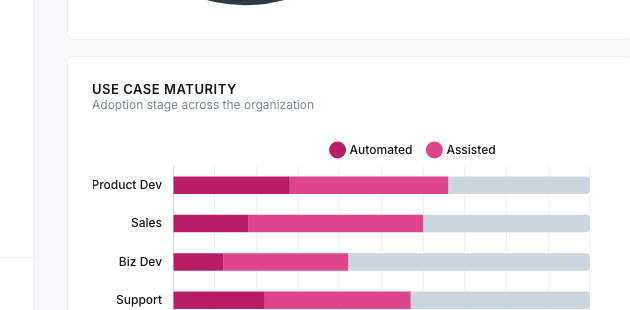
Use case maturity — adoption stages across departments
Quality
Where AI isn't landing

Aggregate satisfaction signals by department. When a team's AI usage drops off or friction patterns emerge, you'll know before they quietly stop using it altogether.

ROI
Cost allocation by department

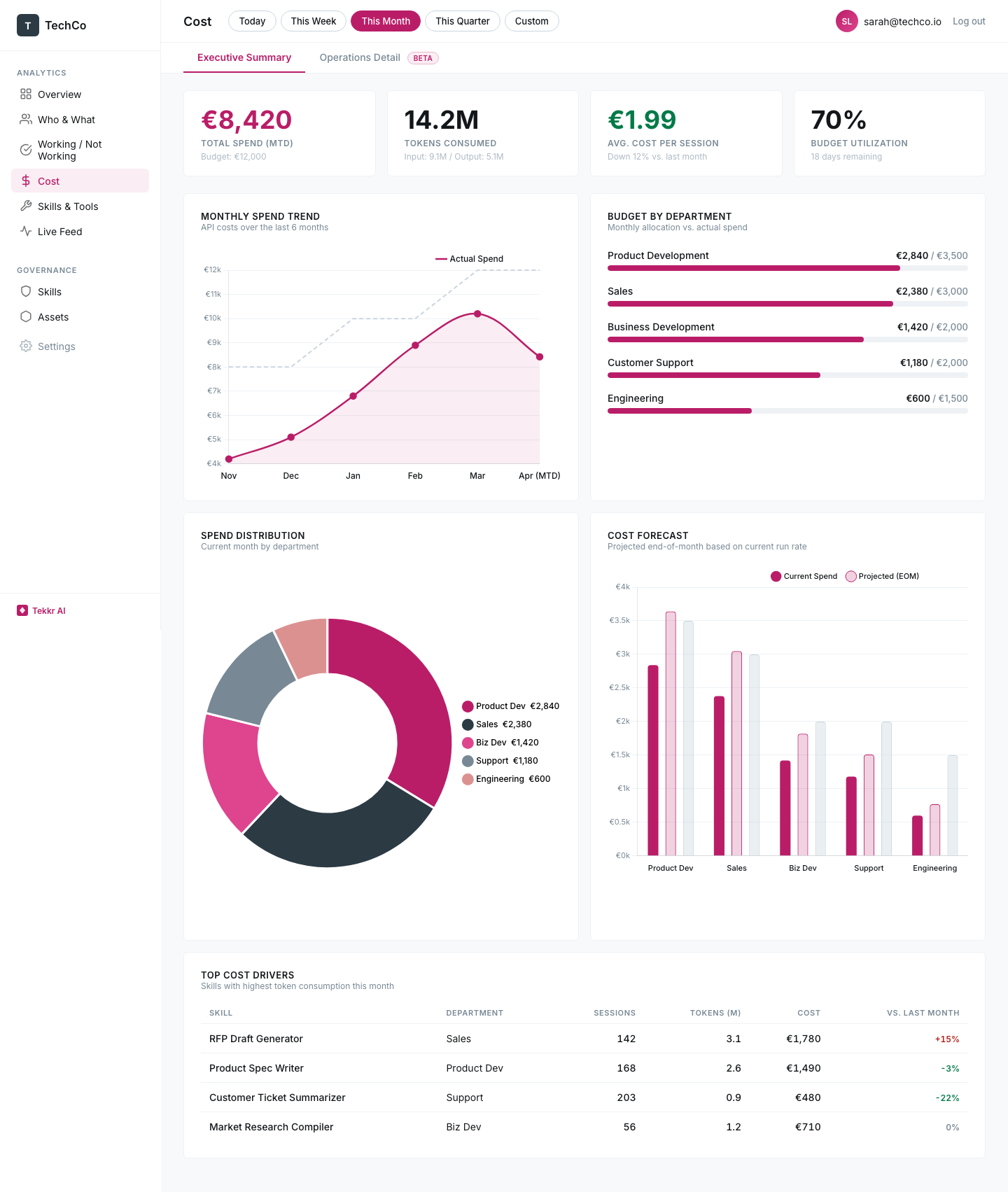
Token costs mapped to teams, functions, and use cases — the kind of breakdown that turns "we spent €8k on AI this month" into a conversation your CFO can actually work with.

Cost analytics — spend trends by department, budget allocation
Operations
Optimization recommendations

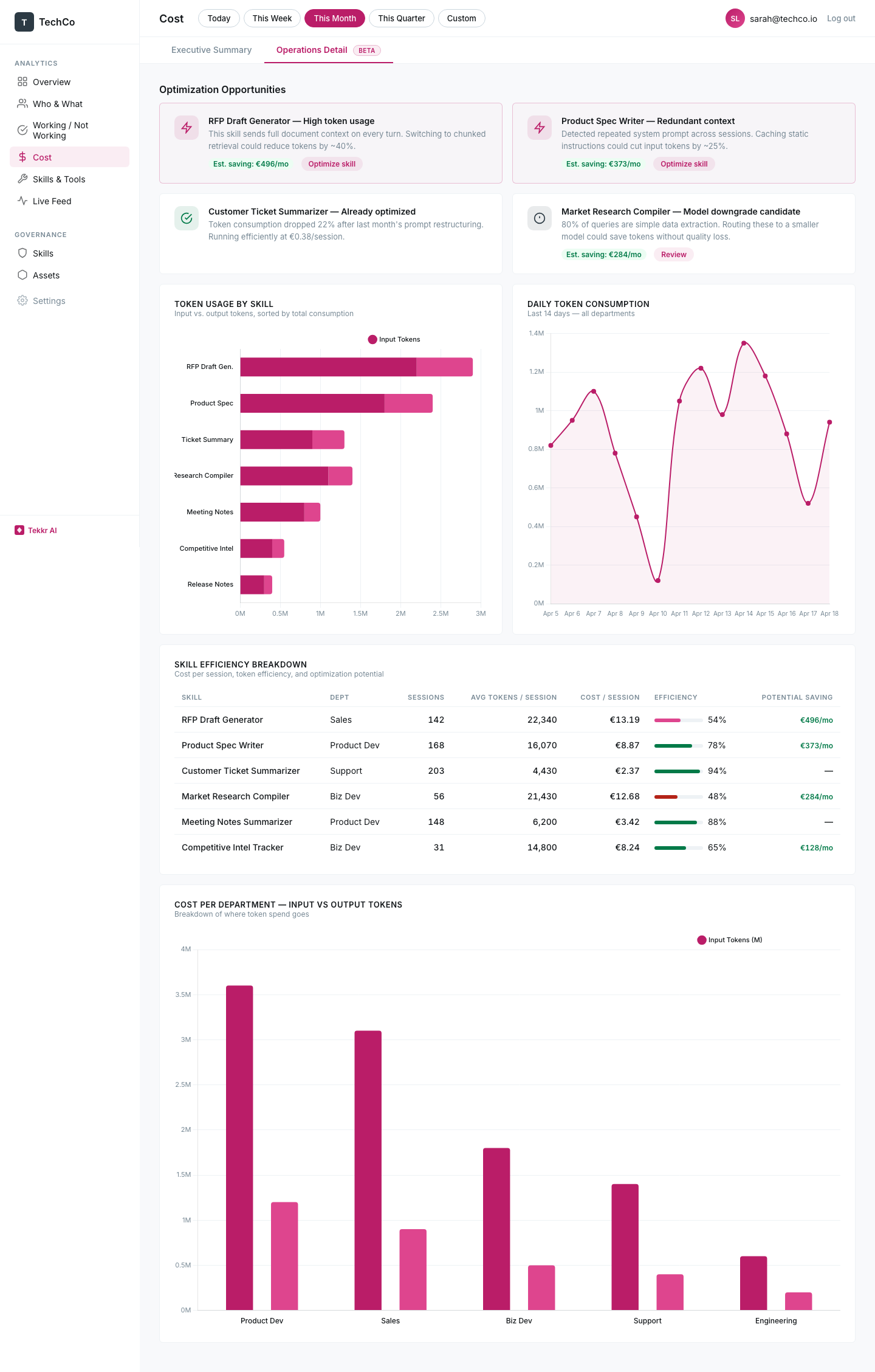
The platform flags skills that are burning through tokens unnecessarily, prompts that could use retrieval instead of full context, and models that could be downgraded without losing quality. Each recommendation comes with an estimated monthly saving.

Cost operations — optimization opportunities and token usage
Privacy
Private by architecture

Raw prompts are never persisted. PII is stripped automatically, and nothing can be traced back to an individual. AES-256 encryption, EU-hosted infrastructure. The people using AI at your company will never feel watched, because they aren't.

Define how AI works at your company. Then push it everywhere.

The assistants will change — Claude today, Gemini next quarter, something that doesn't exist yet after that. Your company's AI playbook shouldn't have to change with them.

Company-wide AI playbook

Define your tone, data handling policies, approved workflows, and guardrails in one place, then push them to every assistant via MCP. A new hire on day one gets the same AI setup as someone who's been using it for a year.

Department-level configurations

What engineering needs from AI is fundamentally different from what sales or legal needs. Configure each function independently and enforce the rules automatically across every assistant.

Vendor-independent by design

Built on MCP, the open standard for AI tool integration. When you switch assistants, add new ones, or sunset old ones, your configurations come with you — no migration, no rework.

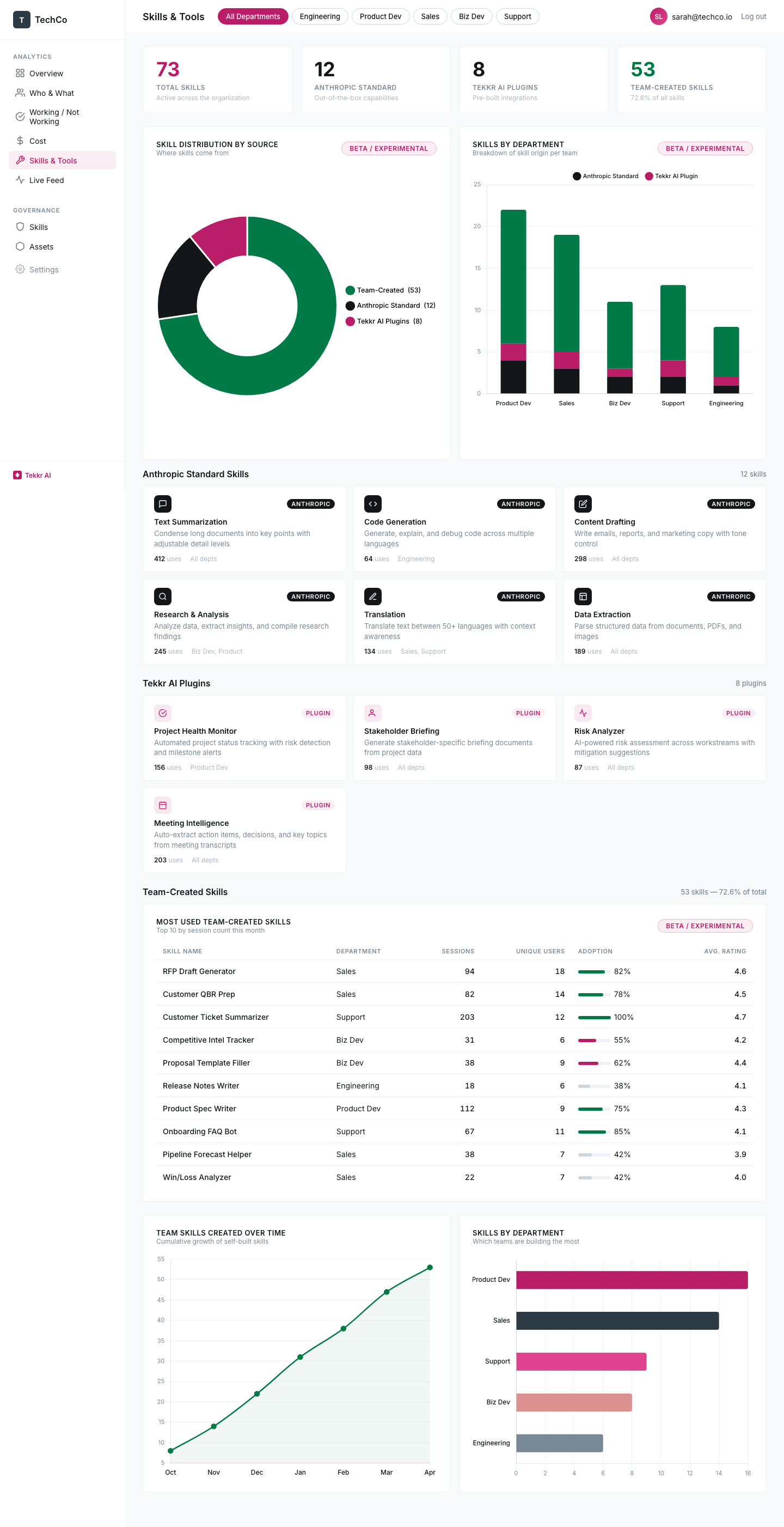
Skills & Tools — manage AI configurations across departments
How a company works is too important to be locked into one AI vendor.

Setup takes a day, not a quarter.

1
Connect

OpenTelemetry for usage telemetry, MCP for governance — or a full gateway if you want complete control. There's nothing to install on anyone's machine, and the integration doesn't change any existing workflows.

2
See

Your org-wide dashboard goes live within hours, showing adoption by department, use case distribution, and cost allocation from the moment the connection is active.

3
Improve

Start pushing configurations to standardize how AI works across teams. The dashboard shows you which departments adopt them and where the impact lands.

Starts with Claude. Expands to everything.

Claude Cowork has full MCP support today, which is why it's where we start. As Gemini, GitHub Copilot, and Microsoft Copilot adopt the standard — and they are — they'll connect to the same dashboard and governance layer without any changes on your end.

Built by the people who did it, not the people who advise on it.

"Tekkr built the operational backbone that got us from Series A to unicorn valuation. When they say they understand what scales, it's because they were in the room building it."
— Parloa leadership
"We put Claude Cowork in front of 20 technical project managers with Tekkr. Within weeks we could see adoption at the team level and push configurations that people actually used."
— Orbem engineering

Pricing that gets out of the way.

The free tier gives you 30 days of rolling data with unlimited users — enough to see the full picture and decide if it's worth going deeper.

Free
$0 / month
  • 30-day rolling analytics
  • Unlimited users
  • Adoption by department
  • Use case breakdown
  • GDPR / EU hosted
Start Free
Pro
Custom
  • Full analytics history
  • Governance & configurations via MCP
  • Department-level rules
  • Spend & ROI dashboards
  • Custom branding
  • Priority support
Contact Us
Enterprise
Custom
  • Everything in Pro
  • Full gateway option
  • Cross-company benchmarking
  • SSO / SAML
  • Dedicated account manager
  • SLA guarantees
  • On-premise option
Talk to Sales

Frequently asked questions

Through a combination of OpenTelemetry and MCP (Model Context Protocol) — both open standards. OpenTelemetry captures usage telemetry the same way engineering teams already monitor their infrastructure. MCP handles governance and configuration deployment. For organizations that want deeper control, we also offer a full gateway option. There are no proprietary agents or browser extensions to install, and the configuration is visible to every user.
Aggregate patterns at the team and department level — which groups use AI, for what categories of work, and what it costs. Raw prompts are never persisted, PII is stripped automatically, and we don't build individual user profiles. The smallest unit of analysis is a team, not a person.
Yes, and by architecture rather than just policy. Raw prompts are never persisted, PII is stripped automatically, and all stored data uses AES-256 encryption on EU-hosted infrastructure. Nothing can be traced back to an individual user.
This is something we designed for from the start. Raw prompts are never persisted, PII is stripped automatically, and all data is aggregated at the department level — there's no way to trace anything back to a specific person. The dashboard that leadership sees contains the same aggregate data that teams themselves can access.
Tekkr AI is built on MCP, which is emerging as the universal integration standard for AI tools. Claude has full support today, and Gemini, GitHub Copilot, and Microsoft Copilot are all adopting it. As they do, they'll connect to your existing dashboard and governance rules automatically — no migration required.
Claude's admin console tells you how many seats are active. Tekkr AI sits a layer above that — it shows you what departments are actually doing with those seats, how costs map to business functions, and gives you the ability to push configurations that standardize AI usage across the entire org. And because it's vendor-independent, the same analytics and governance work when you add Gemini or Copilot later.
Everything you need to understand your org's AI adoption: 30 days of rolling data, unlimited users, department-level adoption metrics, and use case breakdown — all fully GDPR compliant. It's designed to give you enough insight to make a confident decision about going deeper with historical data, governance features, and ROI dashboards.
Most teams see data the same day. The technical setup takes minutes — it's a single line of configuration. The rest of the time goes into deciding how you want to structure your view: by department, by function, by location. Because the platform is GDPR compliant by architecture, there's no security review or procurement process blocking you.

The next time someone asks what you're getting for your AI spend, have a real answer.

Start Free Trial